
Coaches and educators already have enough on their plates. Reviewing video, tagging key moments, and building meaningful feedback takes time, especially when you are balancing multiple cohorts, classes, or teams. That is why we built Auto-Code: a smarter way to get started.
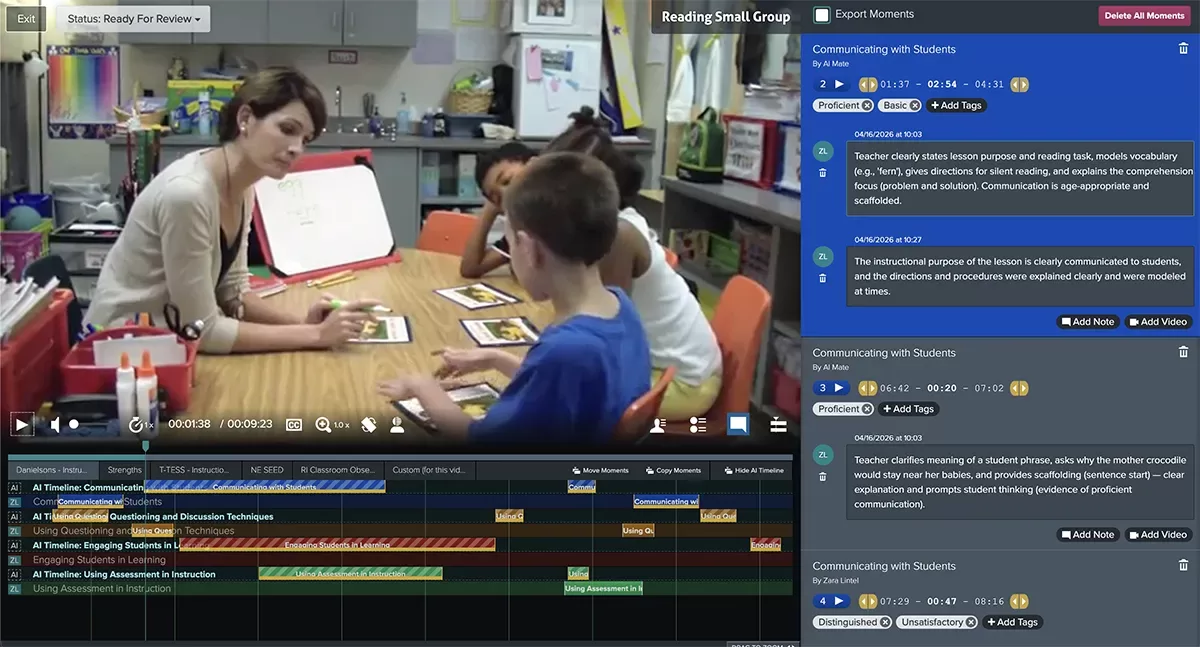
Auto-Code gives you an AI-generated first pass of video analysis based on:
- Your selected form
- One or more selected PDFs
Instead of starting from a blank timeline, you get a structured set of suggested coded moments right away, so you can spend less time on setup and more time coaching.
Why Auto-Code matters
Save time without sacrificing quality.
Auto-Code helps reduce the manual effort of initial tagging by identifying moments aligned to your form and supporting documents. You still stay in control, but now you are reviewing and refining instead of building everything from scratch.
Get a strong first pass for analysis
Think of Auto-Code as your assistant for round one. It gives you a useful starting point that can accelerate analysis workflows and help coaches focus on interpretation, teaching decisions, and next steps.
Copy or move AI-coded moments to your own timeline
Auto-Coded moments are designed to be actionable. You can copy or move AI-coded moments into your own timeline, making it easy to turn AI suggestions into your personal coaching workflow and final feedback.
Built with privacy in mind
AI analysis is not automatically shared with anyone. Only the user who runs Auto-Code can see those results. This keeps exploratory AI analysis private until you decide what to do with it.
Who can use Auto-Code
Auto-Code is currently available only to users with one of these roles:
- Educator
- Administrator
If you are in one of those roles, you can start using Auto-Code today to speed up your workflow and get to insights faster.
Auto-Code is about giving coaches a head start, not replacing coach judgment. You bring the expertise. Auto-Code helps you get there faster. To give Auto-Code feature a try, start a free trial today.